
I really think a lot of people are sitting on Artificial Intelligence. It has a lot more potential than you think. It does require a lot of experimentation to discover what it can and cannot do. I used to like web services and created quite a few of them. But web services have largely been replaced by MCP Server (Model Context Protocol) which allows Artificial Intelligence to pull data from your data provider. I don’t know if there is a standard way to convert a web service to a MCP Server but Microsoft Copilot walked me through the steps to accomplish this. So the conversion of ASMX to MCP is a solved problem.
For demonstration purposes I choose my old BookServices web service at http://www.williamsportwebdeveloper.com/BookServices.asmx ASMX web services were SOAP-based XML web services introduced in early ASP.NET (2000-2002). They expose server-side methods over HTTP, allowing remote clients to call them using standardized SOAP envelopes. They run under IIS and rely heavily on XML serialization and the System.Web.Services namespace. So this web service is ancient and uses technology which does not work well with Artificial Intelligence.
Given the limitations of my web server which can run ASP.NET and PHP but not Python, the first step Microsoft Copilot helped me with was creating a PHP script to serve as the MCP Server endpoint. There are two core transport mechanisms to communicate with AI clients: Streamable HTTP or Standard Input/Output (Stdio) and obviously stdio was off the table.
Here is the code for mcp_server.php:
header("Content-Type: application/json");

// Load SOAP client
$wsdl = "http://www.williamsportwebdeveloper.com/BookServices.asmx?WSDL";

try {
    $soap = new SoapClient($wsdl, [
        "trace" => true,
        "exceptions" => true
    ]);
} catch (Exception $e) {
    echo json_encode([
        "error" => "SOAP initialization failed: " . $e->getMessage()
    ]);
    exit;
}

// Read JSON POST body
$raw = file_get_contents("php://input");
$req = json_decode($raw, true);

if (!$req) {
    echo json_encode([
        "error" => "Invalid JSON request"
    ]);
    exit;
}

$id = $req["id"] ?? null;
$method = $req["method"] ?? null;
$params = $req["params"] ?? [];

// Auto-discover SOAP methods
function getSoapMethods($soap) {
    $functions = $soap->__getFunctions();
    $methods = [];

    foreach ($functions as $f) {
        // Parse: "string GetBookInfo(string isbn)"
        if (!preg_match('/^\s*\S+\s+(\w+)\s*\((.*)\)\s*$/', $f, $m)) {
            continue;
        }

        $name = $m[1];
        $args = trim($m[2]);

        $props = [];
        $required = [];

        if ($args !== "") {
            $parts = explode(",", $args);
            foreach ($parts as $p) {
                $p = trim($p);
                $pieces = preg_split('/\s+/', $p);
                $argName = end($pieces);
                $props[$argName] = ["type" => "string"];
                $required[] = $argName;
            }
        }

        $methods[] = [
            "name" => $name,
            "description" => "SOAP operation " . $name,
            "input_schema" => [
                "type" => "object",
                "properties" => $props,
                "required" => $required
            ]
        ];
    }

    return $methods;
}

// Handle MCP methods
try {
    if ($method === "getTools") {
        echo json_encode([
            "id" => $id,
            "result" => getSoapMethods($soap)
        ]);
        exit;
    }

    // Otherwise treat as SOAP operation
    $result = $soap->__soapCall($method, [$params]);

    echo json_encode([
        "id" => $id,
        "result" => $result
    ]);
    exit;

} catch (Exception $e) {
    echo json_encode([
        "id" => $id,
        "error" => $e->getMessage()
    ]);
    exit;
}
I tested this in Postman, which by the way, now has an AI Agent Mode. In the Model Context Protocol (MCP) specification, the tools/list endpoint is used by a client to discover what executable functions an MCP server offers. Here is the JSON to send in a request for that.
{
  "id": 1,
  "method": "getTools"
}
And here is the JSON you get in the reply:
{
    "id": 1,
    "result": [
        {
            "name": "GetBooksByTitle",
            "description": "SOAP operation GetBooksByTitle",
            "input_schema": {
                "type": "object",
                "properties": {
                    "$parameters": {
                        "type": "string"
                    }
                },
                "required": [
                    "$parameters"
                ]
            }
        },
        {
            "name": "GetBooksByAuthor",
            "description": "SOAP operation GetBooksByAuthor",
            "input_schema": {
                "type": "object",
                "properties": {
                    "$parameters": {
                        "type": "string"
                    }
                },
                "required": [
                    "$parameters"
                ]
            }
        },
        {
            "name": "GetBooksByTitle",
            "description": "SOAP operation GetBooksByTitle",
            "input_schema": {
                "type": "object",
                "properties": {
                    "$parameters": {
                        "type": "string"
                    }
                },
                "required": [
                    "$parameters"
                ]
            }
        },
        {
            "name": "GetBooksByAuthor",
            "description": "SOAP operation GetBooksByAuthor",
            "input_schema": {
                "type": "object",
                "properties": {
                    "$parameters": {
                        "type": "string"
                    }
                },
                "required": [
                    "$parameters"
                ]
            }
        }
    ]
}
Now the next step was to test this with an AI client and the easiest one to use is Copilot within Visual Studio Code. First I had to create a mcp.json file with this JSON:
{
  "servers": {
    "bookService": {
      "type": "http",
      "url": "https://www.williamsportwebdeveloper.com/cgi/mcp_server.php"

    }
  }
}
The next step is to restart Visual Studio Code and register the tools using @bookService getTools.
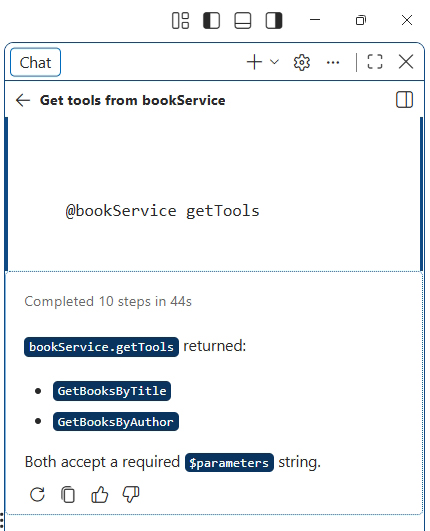
There were a lot of steps involved but Microsoft Copilot guided me every step of the way. Here is what a prompt looks like in Visual Studio Code.
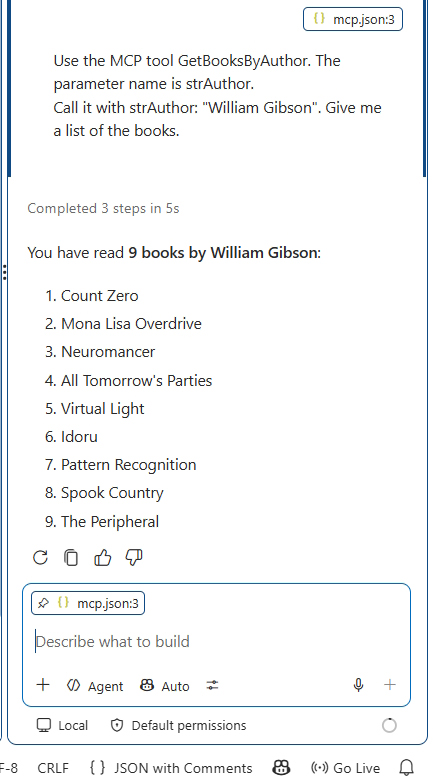
This might seem pointless but it does demonstrate how you can get your chatbot to pull data from your web service to respond to your prompt. Now I don’t need to use the PHP Web Application which I use with my reading list table. Well … I still use it for data entry.

